 Minecraft Skin Editor
 English
 Deutsch
 Français
 Português
 Italiano
 Español
 Nederlands
 Polski
 Türkçe
 Svenska
 Indonesian
 简体中文
 Русский
 ภาษาไทย
 Čeština
 Ελληνικά
 Magyar
 Română
 Slovenčina
 Dansk
 日本語
 Tiếng Việt
 한국어
 Українська
 العربية
 हिन्दी
 Filipino
 Bahasa Melayu
 Norsk
 Suomi
How a skin file is built
A Minecraft character is made of six boxes: the head, the body, two arms and two legs. The skin file is these boxes cut open and laid flat, like a paper model. Every box has six faces: top, bottom, right, front, left and back.
In the file, each box takes the same shape: the top and the bottom are in the first row, and the right side, the front, the left side and the back follow each other in the second row.
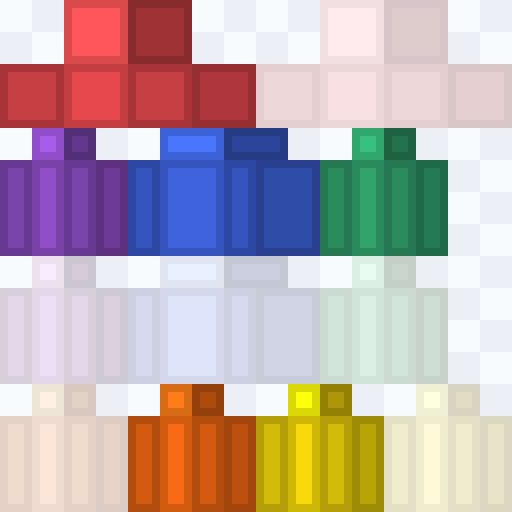
What the colors in our template mean
- Red: the head (top-left) and the hat layer (top-right).
- Blue: the body, with the jacket layer below it.
- Green: the right arm, with its sleeve below it.
- Yellow: the left arm and its sleeve (bottom row).
- Purple: the right leg, with its pants layer below it.
- Orange: the left leg and its pants layer (bottom row).
Lighter areas are the outer layer. Checkered areas are not used by the game and should stay transparent. Download the color-coded templates for free on the skin bases page.
Right and left
“Right” and “left” always mean the character's own sides. When you look at the character from the front, its right arm is on your left. The same goes for the side faces of each box: the right face of the head is the side with the character's right ear.
Base layer and outer layer
Each body part has two layers. The base layer must be fully painted: transparent pixels there turn black in the game. The outer layer is drawn a little bigger than the body and can be partly transparent, which is how hair, hats, hoods and sleeves get their 3D look.
Slim arms
Slim (Alex) skins use the same layout, but the arms are 3 pixels wide instead of 4. A few columns at the edge of each arm area stay empty. See the Steve vs Alex guide for details.
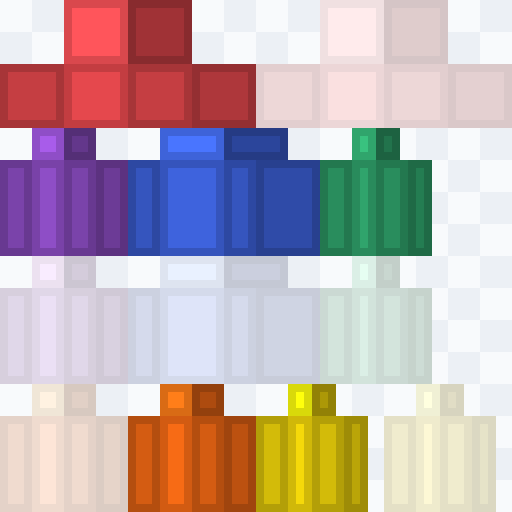
Old 64×32 skins
Before Minecraft 1.8 skins were 64×32 pixels. They have no separate left arm and leg, the game simply mirrors the right ones, and the only outer layer is the hat. The skin converter turns such skins into the modern 64×64 format.
Drawing a skin in Paint, Photoshop or GIMP
- Set the canvas to exactly 64×64 pixels and zoom in a lot.
- Use a 1-pixel pencil without smoothing (anti-aliasing).
- Save as PNG with transparency, never as JPG.
- Check the result on a 3D model, for example in our 3D skin viewer.
Or skip all of that and paint right on the 3D model in our skin editor.
Questions and answers
What size is a Minecraft skin?
64×64 pixels. Old skins are 64×32 pixels and still work, the game upgrades them automatically.
Why must the template be a PNG?
Only PNG keeps the transparent areas of the outer layer. JPG adds blurry edges and loses transparency.
Can a skin have transparent parts?
Only on the outer layer. Transparent pixels on the base layer are shown as black.
Where is the hat layer?
To the right of the head, in the top-right corner of the file.